How to Get WiFi in Mexico: A 2026 Traveler's Guide (No SIM Needed)
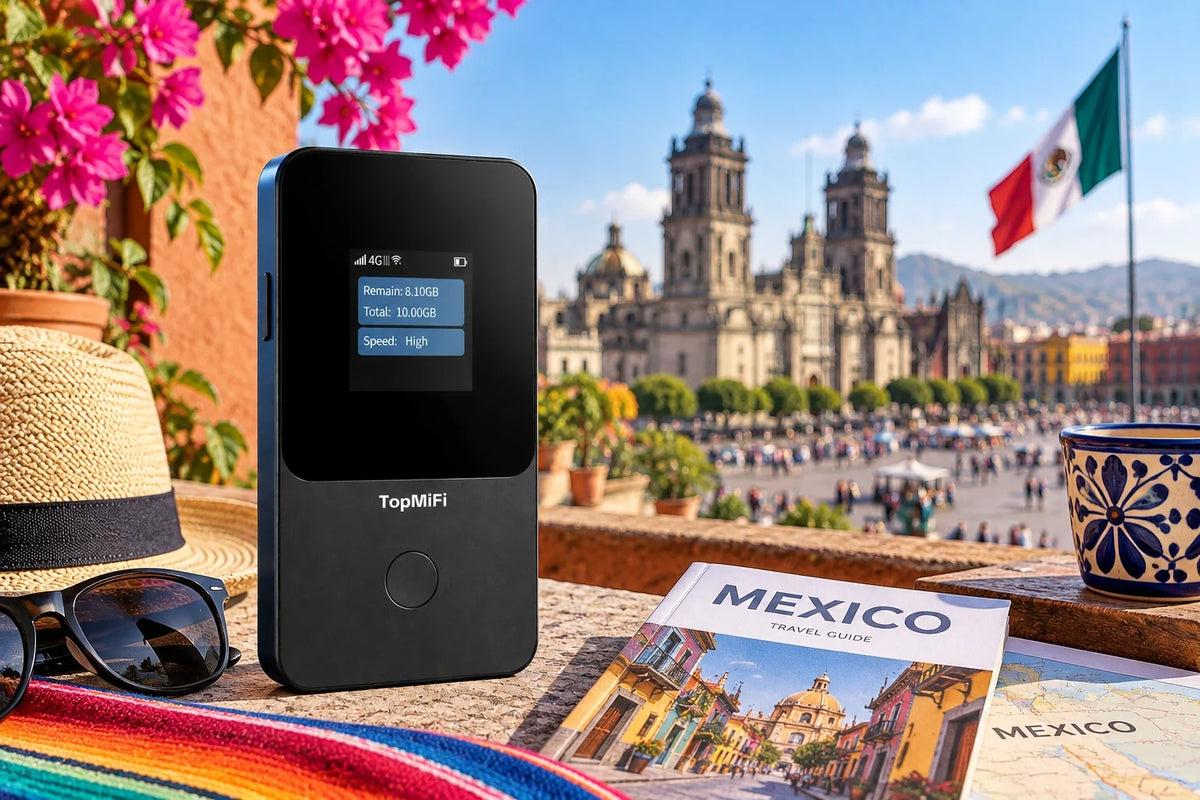
Working out how to get WiFi in Mexico before you go is one of the easiest ways to make the trip run smoothly — from booking a safe ride across Mexico City to pulling up directions on the drive from Cancún to the ruins at Tulum. You don't need to hunt down a local SIM on arrival: a no-SIM device like the TopMiFi T8 pocket WiFi connects to Mexico's networks automatically the moment you land, with nothing to insert.
The right setup depends on how you travel — a solo traveler in Mexico City, a couple at a Riviera Maya resort, or a family road-tripping the Yucatán each point to a different choice. That runs from a travel eSIM on your phone to an always-on unit like the TopMiFi TD20 as a shared base for a villa or a group.
If you're still deciding how to handle data abroad at all, it's worth getting the basics straight first — our guide to whether you need a SIM card to travel walks through every option in plain terms.
And for choosing a device that travels with you anywhere, not just to Mexico, our guide to the best portable WiFi for international travel is a good place to start. Below we break down connectivity in Mexico option by option, with the local detail that actually matters on the ground.
The short answer: You do not need a physical SIM card to get online in Mexico. A travel eSIM or a no-SIM pocket WiFi device connects to Mexico's local networks automatically, so you're online the moment you arrive — no shop, no card, no surprise bill.
Solo travelers with a compatible phone can lean on an eSIM; couples, families, and anyone with a laptop are better off with a portable hotspot that shares one connection across every device — and it keeps you online well beyond the resort WiFi, out at the ruins, cenotes, and beaches.
A note for US travelers: your plan may already cover Mexico
Mexico is the top international destination for US travelers, and here's the thing worth knowing up front: many US carrier plans already include some data roaming in Mexico, often bundled with Canada as part of a North America allowance. If that's you, check your plan before you buy anything — you may already be covered for light use.
But there are real limits to lean on. That included roaming is often capped or slowed after a certain amount of data, it only covers the one phone it's on, and travelers from outside the US — or on plans that don't include Mexico — get none of it and face expensive standard roaming instead. For a family where everyone needs to be online, a longer stay, heavy use, or anyone who isn't on a US plan with Mexico included, a no-SIM hotspot or eSIM is still the simpler, more predictable way to stay connected — and it shares one connection across the whole group rather than just one handset.
Do you really need WiFi in Mexico?
For most visitors, being connected turns a good Mexico trip into an effortless one. In Mexico City, a live connection lets you call an Uber — widely used there and generally a safer, fuss-free alternative to hailing a cab on the street — navigate the metro, and tap through to restaurant and museum details. Along the Riviera Maya, it's how you book tours, check cenote and ruin opening times, and keep plans moving. And because much of Mexico runs on Spanish, Google Translate for menus and signs smooths the language gap.
On the road and off the beaten path, a connection matters just as much. Driving the Yucatán between Chichén Itzá, Valladolid, Mérida, and the coast, up-to-date maps guide you along the toll (cuota) and free (libre) highways and help you find fuel and parking. Being able to pull up a booking, message a host, share your location with family, or find the nearest ATM for pesos keeps the trip relaxed rather than stressful.
Is there free WiFi in Mexico?
There's a fair amount, especially where tourists go. Hotels and all-inclusive resorts, cafés, restaurants, malls, and airports across Mexico offer free WiFi, and in the resort zones of Cancún and the Riviera Maya it's nearly everywhere indoors. In a pinch you can get plenty done over a café or lobby connection.
The limitations are the familiar ones, though. Free WiFi in Mexico is often slow, time-limited, and gated behind a login, and resort WiFi can crawl once the whole property is online in the evening. Most importantly, it stops at the resort gate — there's little to none out at the ruins, the cenotes, the beaches, or on the highway between towns, which is exactly where you most need maps and messaging. Treat free WiFi as a handy bonus indoors, not the backbone of your connectivity.
Beyond the resort: a note on coverage
Mexico's mobile networks are good where most travelers spend their time — 4G LTE is fast and widespread across Mexico City, Guadalajara, Monterrey, the main resort areas, and the larger towns. For city breaks and resort stays, you'll have a strong, reliable signal nearly everywhere.
Where it thins out is the predictable places: remote stretches of highway, small villages, the jungle around some archaeological sites and cenotes, and parts of the Baja and mountain regions. It's realistic to expect the occasional drop there rather than flawless signal everywhere. The practical takeaway: a good no-SIM device connects to whichever local network is strongest in a given area, which is the best way to stay on the air — and saving offline maps before a ruins day or a long drive covers you for the rare dead zone. It's a coverage quirk to plan around, not a reason to worry.
Ways to get online in Mexico, compared
There are five realistic ways to stay connected during a Mexico trip. Here's how each works and who it suits best.
1. Carrier roaming
Leaving your home SIM in and switching on roaming is the zero-effort route. As covered above, many US plans include some Mexico roaming, which makes this genuinely convenient for US travelers with light needs — just watch for speed caps and data limits. For visitors from outside the US, or on plans without Mexico included, standard international roaming rates are usually the most expensive way to get online. Check what your plan actually includes before relying on it.
2. A local Mexican SIM card
You can buy a prepaid SIM from a Mexican carrier at the airport, a phone shop, or a convenience store and swap it into your handset. In-country data is affordable and coverage on the main networks is good, but you'll queue, physically change your SIM and safeguard the original, and give up your normal number. It also only helps the one phone it's in — and makes less sense if you're only in Mexico for a short beach break.
3. A travel eSIM for Mexico
If your phone supports it, you can install a Mexico data plan digitally before you leave home and switch it on when you arrive — no physical card at all. It's clean and quick for a solo traveler, though it covers only that one phone, and tethering to other devices drains your battery fast. If you're weighing a digital SIM against a shared device, our full comparison of eSIM vs pocket WiFi lays out the trade-offs.
4. Renting a pocket WiFi
You can rent a portable hotspot for your trip, picking it up at the airport or having it sent to your first hotel, and returning it when you leave. It shares one connection across your devices, but you'll pay a daily fee for every day of the trip, leave a deposit, and deal with pickup, return, and possible late or damage charges. It's convenient for a single one-off visit, but you're paying to borrow the same thing each time you travel.
5. Bringing your own no-SIM hotspot
A portable hotspot you own, with a built-in virtual SIM, connects to Mexico's local networks automatically the moment you power it on — no card, no rental counter, no return deadline. It shares a private connection across all your devices and, because it works across 150+ countries, the same unit covers your next trip anywhere in the world, not just Mexico. For anyone who travels more than once, owning beats renting on both cost and convenience.
Why "no-SIM" is the easiest way to get WiFi in Mexico
Two of those five options — a travel eSIM and a no-SIM hotspot — skip the physical card entirely, and for most visitors that's exactly what you want in Mexico. You avoid the airport SIM queue after your flight, you keep your home number active, there's no tiny card to lose, and you're not depending on whether your home plan's Mexico roaming has a cap. A good no-SIM setup has you online within a minute of landing, connected to the same reliable Mexican networks a local SIM would use — so you can book your first safe Uber before you leave the terminal.
It also shines the moment you leave the resort. Because a quality hotspot connects to whichever local network is strongest where you're standing, you stay online out at the ruins, the cenotes, and the beaches where resort WiFi can't reach — and it reconnects automatically as you drive between towns. Pair that with offline maps for the remote stretches and you'll barely notice the occasional dead zone.
One device for Mexico and every trip after
Even if Mexico is a standalone beach trip this time, a no-SIM hotspot pays off beyond it. Because it connects automatically across 150+ countries, the same device you use in Cancún works on your next trip to Europe, Asia, or anywhere else — no new plan, nothing to swap, nothing to return. You just pack it and go.
That's a real advantage over a local Mexican SIM, which stops being useful the moment you leave the country, and over renting a new device for every trip. A single reusable tool that works the same whether you're in Tulum this year or Tokyo next is both simpler and cheaper over time — and it means you never think about travel data again.
How much data do you need for a trip to Mexico?
Mexico is a light-to-moderate data destination for most travelers: your heaviest daily use is maps, ride apps, browsing, messaging, and uploading photos, all modest next to streaming video. These rough estimates help you plan a plan size:
| Activity in Mexico | Rough data use | Intensity |
|---|---|---|
| Maps & Uber rides | ~5–10 MB per hour | Very light |
| Browsing & bookings | ~10–25 MB per hour | Light |
| Messaging & social posts | ~10–30 MB per hour | Light |
| Video calls home | ~0.5–1.5 GB per hour | Heavy |
| Streaming video | ~1–3 GB per hour | Heavy |
A typical day of maps, rides, browsing, and messaging uses surprisingly little, so a plan that starts with data included and lets you top up as needed is ideal. If you'll post a lot of beach photos and videos or video-call home often, plan for the heavier end — and remember a shared hotspot pooling data across a family is far more efficient than everyone relying on a separate roaming cap.
What about calls and texts in Mexico?
Most travel setups — eSIMs and pocket WiFi alike — are data-only, and in Mexico that's rarely a problem, because WhatsApp is everything here. It's the default way people communicate — hotels, tour operators, drivers, Airbnb hosts, and restaurants very often prefer WhatsApp over phone calls — so with a data connection active, you can reach almost anyone. WhatsApp, FaceTime, and other call and messaging apps work exactly as they do at home, with no traditional voice plan and no per-minute charges.
Your home number doesn't disappear either. Because a travel eSIM or a virtual-SIM hotspot adds data alongside your existing SIM rather than replacing it, your regular line stays in your phone — so you can still receive an important text, like a bank verification code, while doing your real communicating over apps. If you specifically need a Mexican number for a particular booking, that's one of the few cases a local SIM helps; for the vast majority of travelers, data plus WhatsApp covers the whole trip.
Setting up WiFi for your Mexico trip, step by step
Whichever no-SIM route you choose, getting connected in Mexico is simple:
- Check your current plan first. If you're on a US plan, see whether Mexico roaming is included and what the cap is — then decide if you need more.
- Count your devices. Just your phone points to an eSIM; a partner, kids, or a laptop point to a portable hotspot that covers everyone.
- Arrange data before you fly. Install a Mexico eSIM plan, or pack a hotspot that arrives with data included, so nothing needs sorting after you land.
- Set up WhatsApp and Uber on home WiFi. Have the apps you'll use most ready before you go, so you can ride and message the moment you land.
- Switch on at the airport. Enable your eSIM line or power up the hotspot as you clear the terminal and give it a minute to find a Mexican network.
Tips for staying connected across Mexico
- Save offline maps before ruins days and road trips. Download the Yucatán, Baja, or wherever you're headed in Google Maps so you can still navigate through a dead zone.
- Use your connection for safer rides. In the cities, booking an Uber or a trusted ride app over data is generally smoother and safer than flagging a street taxi.
- Keep a hotspot charged and shaded. A battery model doubles as a power bank; top it up overnight and keep it out of direct sun and away from the pool and beach.
- Lean on WhatsApp and translation. Most bookings and hosts run on WhatsApp, and Google Translate handles Spanish menus and signs — both need a live connection.
- Share your location with family. A steady connection lets you share your live location on long drives or nights out, which is reassuring for everyone back home.
WiFi in Mexico: options at a glance
Here's how the main ways to get online in Mexico compare on the questions travelers ask most.
| Option | Needs a physical SIM? | Best for |
|---|---|---|
| Your own no-SIM hotspot | No | Families, groups, and frequent travelers |
| Travel eSIM | No | Solo travelers with a compatible phone |
| US plan roaming | Uses your home SIM | US travelers with Mexico included, light use |
| Rental pocket WiFi | No | A one-off trip, no purchase wanted |
| Local Mexican SIM | Yes | Solo, longer single-country stays |
Which option is right for your Mexico trip?
It comes down to who's traveling and how many devices need to be online. A solo US traveler whose plan already includes Mexico might need nothing extra for light use; a solo visitor without that can do everything on a Mexico eSIM. But a couple sharing maps and photos, a family where the kids each have a device, or anyone road-tripping beyond resort WiFi will get far more from a portable hotspot that puts everyone on one private connection — without burning through a single phone's roaming cap.
If you travel more than once a year, owning a no-SIM device that spans 150+ countries makes the most sense, since the same unit you use in Cancún covers every future trip, replacing rentals, local SIMs, and roaming guesswork with one reusable tool. For a quick one-and-done beach break where your plan has you covered, roaming or an eSIM still does the job. Match the tool to the trip and you'll be online from a Mexico City rooftop to a Yucatán cenote without a second thought.
Frequently asked questions
Do I need a SIM card to get WiFi in Mexico?
No. You can stay online in Mexico with a travel eSIM installed on your phone or a no-SIM pocket WiFi device with a virtual SIM — neither needs a physical card. A local Mexican SIM is one option among several, not a requirement.
Does my US phone plan work in Mexico?
Often, yes — many US plans include some data roaming in Mexico, frequently bundled with Canada. Check your specific plan, and watch for speed caps or data limits. It covers only your one phone, though, so for a family or heavier use, a no-SIM hotspot or eSIM is usually simpler and more generous.
Will I have WiFi at the ruins, cenotes, and beaches?
Resort and hotel WiFi stops at the property, so out at the ruins, cenotes, and remote beaches you'll want your own mobile data. A no-SIM hotspot connects to the strongest local network wherever you are; signal can thin in deep jungle or remote spots, so save offline maps for ruins days just in case.
Which messaging app should I use in Mexico?
WhatsApp, without question — it's how most people, hotels, tour operators, and hosts communicate in Mexico. FaceTime, Messenger, and others work too. As long as you have a hotspot or eSIM active, any of them lets you call and message for free over data.
Can one hotspot keep my whole family online in Mexico?
Yes. A portable hotspot shares one private network across multiple phones, tablets, and laptops at once, so a family pools a single plan instead of everyone relying on separate roaming caps — cheaper and simpler, and it reaches beyond the resort WiFi.
Is it better to use Uber in Mexican cities?
In cities like Mexico City, many travelers prefer booking an Uber or a trusted ride app over hailing a street taxi — it's cashless, tracked, and generally smoother. That relies on a live data connection, which is one more reason to arrive already online with a hotspot or eSIM.
Does pocket WiFi work for a Yucatán road trip?
Yes — coverage is good along the main Yucatán routes and towns, so a hotspot keeps your maps and messaging running between Cancún, Valladolid, Chichén Itzá, and Mérida. Expect the occasional drop on remote stretches, where offline maps and automatic reconnection keep you on track.
Should I rent a pocket WiFi in Mexico or bring my own?
Renting suits a single one-off visit; owning a no-SIM device wins if you travel more than once, since it skips daily fees and returns and works across 150+ countries. Over a couple of trips, buying usually costs less and hassles you less.
Is there enough free WiFi in Mexico to skip getting data?
Only if you never leave the resort. Free WiFi is common indoors but slow, stationary, and absent at the ruins, cenotes, beaches, and on the highway — exactly where you need maps and messaging most. Your own connection is what keeps the trip smooth.
The bottom line
Getting WiFi in Mexico is easier than ever, and you don't need a SIM card to do it. If you're on a US plan, check whether Mexico is already included — but for families, heavier use, travelers from elsewhere, or anyone heading beyond the resort, a travel eSIM or a no-SIM pocket WiFi device is the simpler, more predictable choice. You can land and be online in about a minute — ready to book a safe Uber, navigate the Yucatán, message hosts on WhatsApp, and share the trip — with no shop queue and no roaming-cap anxiety. Coverage is strong in the cities and resort areas, with the occasional drop out at the ruins and on remote highways, so a device that hops onto the strongest local network, plus offline maps, keeps you covered. Solo travelers can keep it light with an eSIM, while couples, families, and frequent travelers are best served by a portable hotspot that shares one connection everywhere and spans 150+ countries. Sort your data before you fly, and Mexico opens up from the moment you arrive.
Stay connected in Mexico with TopMiFi →
Coverage, device compatibility, data allowances, and roaming rules vary by option, carrier, and destination and can change over time. Confirm current details, including what your own plan includes in Mexico, before you travel to make sure your chosen setup fits your trip.