The Best WiFi for Road Trips & RV Travel: In-Car Hotspot Guide (2026)
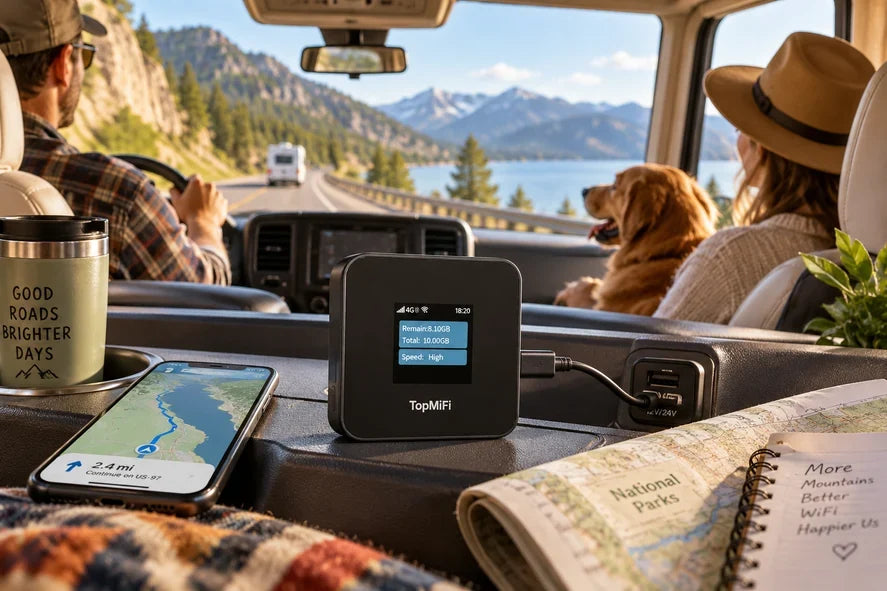
A great road trip runs on two things: a full tank and a connection that does not quit. Whether you are driving the coast, crossing a few countries, or living the RV life for a season, everyone in the vehicle wants to be online at once — for maps up front, music and shows in the back, and work or weather checks along the way. The simplest way to cover a whole car or RV is a dedicated in-car hotspot such as the TopMiFi TD20 in-car WiFi hotspot, which runs off your vehicle's power and keeps up to 16 devices connected, with no SIM and no contract.
This 2026 guide covers why an in-car hotspot beats using your phone as one, how it is powered, what to expect for coverage on the open road, and how to set everything up. Because road trips take you from busy highways to remote backroads, it is worth checking where you will have coverage before you rely on it through the quiet stretches.
Quick answer
For a road trip or RV travel, a dedicated in-car WiFi hotspot is the easiest way to keep everyone online. The TopMiFi TD20 runs off your vehicle's power, so there is no battery to drain, and it connects up to 16 devices at once — enough for a full car or RV of phones, tablets, and a laptop. It needs no SIM and no contract, starts with 10GB, and then you pay as you go. If you also want a connection to carry away from the vehicle, pair it with a battery-powered handheld hotspot.
Why you need WiFi on a road trip or in an RV
A reliable connection changes a long drive from a test of patience into an easy day. Here is where you will lean on it.
- Navigation for the driver. Live maps, traffic, road closures, and fuel stops keep the trip moving and stress-free up front.
- Keeping passengers happy. On long drives, kids with tablets and adults with music or podcasts make the miles disappear. One connection keeps every screen going.
- Working from the road. For van-lifers and remote workers, a dependable connection is the difference between a workday and a lost day — email, calls, and files all need it.
- Campground WiFi is often poor. Many campsites and RV parks advertise WiFi that turns out to be slow, crowded, or barely reaches your pitch. Your own hotspot means you are not depending on it.
- Safety and planning. Weather, booking the next stop, and checking conditions on mountain or desert routes all rely on being online.
In short, on a road trip your connection is shared by the whole vehicle, all day — which is exactly what a dedicated in-car hotspot is built for.
Your options for road trip internet
There are a few ways to get a car or RV online. Each can work; they suit different setups.
| Option | Best for | Watch out for |
|---|---|---|
| In-car hotspot (TD20) | Whole-vehicle use; families and RVs; many devices | Runs off vehicle power, so you need a power source |
| Handheld pocket WiFi (T8) | Carrying a connection away from the car too | Its own battery to charge; up to 8 devices |
| Phone hotspot | Quick, occasional use for one or two devices | Drains your phone battery; ties up your phone; limited sharing |
| Campground / public WiFi | Light use when parked and in range | Often slow and crowded; rarely reaches your pitch |
| International roaming | Very short trips, if your rate is reasonable | Daily fees add up; usually one phone |
The honest summary: a phone hotspot is fine in a pinch but drains your phone and struggles to cover a full vehicle; campground WiFi is a nice bonus but never a plan; roaming gets pricey. For keeping a whole car or RV online all day, a dedicated in-car hotspot is the purpose-built answer.
Why a dedicated in-car hotspot makes sense
The TopMiFi TD20 is built specifically for the vehicle, and that focus is what makes it a good road-trip companion.
It runs off your vehicle's power. The TD20 has no battery to charge or run flat mid-drive — you plug it into your car or RV power and it stays on. There is a Type-A, a Type-C, and a cigarette-lighter option, so it fits whatever your vehicle offers. For a trip where the last thing you want is one more gadget to remember to charge, that is a real advantage.
It covers the whole vehicle. With support for up to 16 devices, the TD20 keeps an entire car or RV online at once — the driver's maps, the kids' tablets, a partner's phone, and a laptop for work, all on one connection.
No SIM, no contract. There is no SIM to buy or swap and no monthly commitment. It starts with 10GB and then you pay as you go, so a seasonal road trip does not leave you tied to a plan afterwards.
It travels across borders. Because a TopMiFi device works across 150+ countries, the same hotspot keeps you connected on a cross-country drive or a multi-country road trip. If your route crosses borders, our complete guide to pocket WiFi for international travel covers how one device handles the whole journey.
In-car hotspot vs phone hotspot vs handheld
Three setups come up for road trips, and the right one depends on how you travel.
A phone hotspot is the quick option, but it drains the battery of the exact phone you are using for navigation, and it is not designed to keep many devices online for hours. It is fine for a short hop, less so for a full day on the road.
A handheld pocket WiFi like the T8 has its own battery and supports up to 8 devices, which makes it the choice when you want to carry the connection away from the car — into a campsite, a cabin, or a hike.
A dedicated in-car hotspot like the TD20 stays plugged into the vehicle, supports up to 16 devices, and runs the whole time you have power, which makes it the natural fit for the driving itself and for a vehicle full of people and screens. Many road-trippers like having both: the TD20 for the drive, and a handheld for when they leave the vehicle.
Coverage on the road
Coverage is the question that matters most once you leave the city, so set expectations honestly. Along major highways and interstates, and in and around towns, you can expect a steady connection for maps, music, and messaging. Signal naturally dips in long mountain passes, deep valleys, and empty desert or forest stretches, then returns as you approach populated areas — that is the nature of any mobile network, not a quirk of one device. In genuinely remote backcountry, plan for stretches with little or no signal, and download your maps and entertainment before you get there. Whatever route you are taking, confirm coverage for those specific roads and regions before you depend on it.
How to set up your in-car hotspot
- Plug it into vehicle power. Connect the TD20 using the Type-A, Type-C, or cigarette-lighter option your vehicle offers. It powers on with the car — no SIM to insert.
- Connect your devices. Join the hotspot's WiFi from phones, tablets, and a laptop, and share the password so the whole vehicle is online.
- Start with 10GB, then pay as you go. The device begins with 10GB; top up only when you need more, with no contract and no auto-renew after your trip.
One practical note: because the TD20 is powered by the vehicle, it is designed to run while you have power. If you are parked and camping with the engine off for a long time, run it from a suitable power source such as an RV's USB outlet or a power bank — or use a battery-powered handheld for time spent away from the vehicle.
Who an in-car hotspot is for
- Families on road trips. Keep every phone and tablet online across a long drive on one connection.
- RV and van-life travellers. A dependable connection for navigation, working remotely, and downtime at camp with power.
- Rideshare and taxi drivers. Offer passengers WiFi and keep your own apps running without draining your phone.
- Long-haul and frequent drivers. A steady connection for maps, calls, and entertainment on the road, every day.
Tips for staying connected on a road trip
- Download before the dead zones. Save offline maps, playlists, and shows on WiFi before you head into remote country.
- Keep it plugged in. Since the TD20 runs off vehicle power, make sure it is connected to a working outlet so it stays on for the whole drive.
- One hotspot for the whole vehicle. Share the password once and let everyone connect, instead of each person using their own data.
- Pack a handheld for off-vehicle time. If you will be away from the car for hikes or camp, a battery-powered hotspot keeps you connected there too.
Frequently asked questions
Does an in-car hotspot need a SIM card?
No. The TopMiFi TD20 needs no SIM and no contract. You plug it into your vehicle's power, connect your devices to its WiFi, and you are online in 150+ countries.
How is the TD20 powered?
It runs off your vehicle's power, with Type-A, Type-C, and cigarette-lighter options, so there is no battery to charge or run flat during the drive. For long stops with the engine off, power it from an RV outlet or a power bank.
How many devices can it connect?
The TD20 supports up to 16 devices — enough for a full car or RV of phones, tablets, and a laptop, all on one connection. The handheld T8 supports up to 8 if you prefer a battery-powered option to carry around.
Will it work when I am parked and camping?
It works whenever it has power. In an RV with USB or 12V outlets, you can keep it running at camp. If your car's engine is off for a long time, run it from a power bank or switch to a battery-powered handheld for that time.
Does it work on an international road trip?
Yes. A TopMiFi hotspot works across 150+ countries, so the same device keeps you online on a cross-border drive — no new plan at each border.
Is an in-car hotspot better than using my phone as a hotspot?
For a road trip, usually yes. A phone hotspot drains the battery of the phone you are navigating with and is not built to keep many devices online for hours. A dedicated in-car hotspot runs off the vehicle and covers the whole group.
The bottom line
A road trip or RV adventure is better when the whole vehicle stays online — maps up front, entertainment in the back, and work or weather whenever you need it. A dedicated in-car hotspot is the purpose-built way to do that: powered by your vehicle, up to 16 devices, no SIM and no contract, and coverage across 150+ countries. Get the TopMiFi TD20 for 10GB to start, then pay as you go.